Creating a Christmas Nativity 3D Light Box with SVG: A Unique Way to Celebrate and Educate
The birth of Jesus is one of the most cherished and significant events in Christian tradition. While storytelling has always been an essential part of passing down this message, visual representations offer a powerful complement. What better way to explain the birth of Jesus than using a picture? But not just any picture — a design with 3D effects. The Christmas Nativity 3D Light Box SVG brings the story to life in a dynamic, engaging format that appeals to both young and old.
What Is a 3D Light Box?
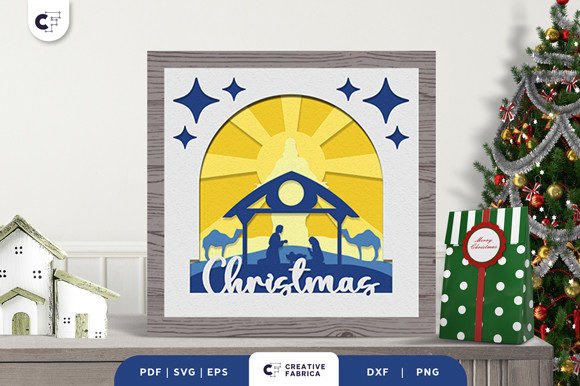
A 3D light box is a decorative piece that uses layered paper cutouts illuminated from behind to create depth and dimension. When applied to the nativity scene, it transforms a flat image into a vivid representation of the holy family’s surroundings. These designs are often crafted using digital files such as SVG (Scalable Vector Graphics), which allow for precise cutting on machines like Cricut or Silhouette. The result is a visually striking display that can be used in homes, classrooms, churches, or even as a thoughtful gift.
Why Choose a 3D Light Box for the Nativity Scene?
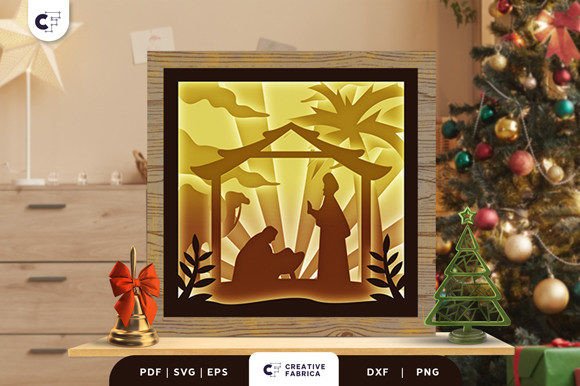
The Christmas Nativity 3D Light Box SVG offers more than just aesthetic appeal. It serves as an educational tool, particularly for children. By visualizing the story through layers of intricate paper cuts, learners can better understand the characters involved, the setting, and the overall narrative. For example, in many designs, you’ll find Jesus lying in a manger beneath a tent, surrounded by palm trees in a desert landscape. A bright light often emerges from below, symbolizing the divine presence at His birth.
Practical Benefits of Using 3D Paper Cuts
- Engagement: Children are naturally drawn to visual and tactile learning. A 3D light box makes the story of the nativity more interactive and memorable.
- Creativity and Craftsmanship: Creating a 3D light box involves careful layering and assembly, encouraging attention to detail and artistic expression.
- Reusable Decor: Unlike traditional paper crafts, a well-made 3D light box can be disassembled and stored, making it perfect for annual holiday displays.
- Customization: With SVG formats, users can easily scale the design to fit different frame sizes or adjust colors to match their personal preferences.
How to Make a 3D Light Box from an SVG File
Making a 3D light box may sound complex, but it’s surprisingly simple when you follow a few clear steps. Here's how to turn your Christmas Nativity 3D Light Box SVG into a stunning piece of art:
- Get a Frame: Choose a shallow shadow box frame with a back panel. This will hold the layered paper cutouts securely while allowing light to pass through.
- Select Your Design: Download or purchase the SVG file for the nativity scene. Ensure it includes multiple layers for proper depth.
- Print and Cut: Print the design onto high-quality cardstock, ideally Encore Cardstock 80 lb cover (216 gsm), and use a cutting machine to precisely cut out each layer.
- Layer the Pieces: Apply glue or tape to assemble the layers in order, starting with the background and working forward to the foreground elements. Each layer should slightly overlap the previous one to build depth.
- Insert Into the Frame: Place the final bottom layer against the back of the frame, then carefully insert all the other layers until the topmost piece is in place.
- Add Lighting: Insert a small LED light or battery-operated string lights inside the frame to illuminate the scene from behind, creating a magical glow effect.
Design Details and Specifications
When choosing a Christmas Nativity 3D Light Box SVG, pay attention to the following details:
- Number of Layers: A typical nativity design features around six layers. More layers mean greater depth and realism.
- Size: Most kits are sized at approximately 20.32×20.32 cm (8x8 inches), ideal for standard frames and easy to manage for beginners.
- File Formats: You'll usually receive the design in multiple formats including SVG, PDF, EPS, PNG, and DXF. This ensures compatibility with various cutting tools and software.
- Color Variations: Note that the images provided are for preview purposes only. The actual product color may vary slightly due to differences in lighting sources and the natural tint of the cardstock used.
Use Cases for the Nativity 3D Light Box
These light boxes have a wide range of applications across different settings:
Educational Environments
Schools and Sunday schools often use 3D nativity scenes as teaching aids. The layered design helps students grasp spatial relationships and symbolism within the biblical narrative. Teachers can incorporate these models into lessons about Christmas traditions, religious history, or seasonal celebrations.
Home and Church Decor
During the holiday season, a 3D light box can serve as a beautiful centerpiece in living rooms, nurseries, or church halls. Its subtle illumination adds a warm, spiritual ambiance without overwhelming the space. It also makes a meaningful addition to Advent calendars or devotional setups.
Gift-Giving and Business Opportunities
For hobbyists and creators, assembling a nativity 3D light box can be a rewarding project to give as a handmade gift. Business owners might consider offering them as part of holiday-themed products, especially if they cater to religious markets or craft enthusiasts. The ability to customize and scale the design opens up numerous possibilities for branding and personalization.
Considerations for Assembling and Displaying the Light Box
While the process of making a 3D light box is straightforward, there are several factors to keep in mind for optimal results:
Material Quality Matters
The recommended cardstock, Encore Cardstock 80 lb cover 216 gsm, provides excellent rigidity and durability. Using lower quality materials may lead to warping or tearing during assembly or display. Always test the paper before beginning the full project to ensure it holds up well under handling and light exposure.
Lighting Options
LED lights are preferred for their low heat output and energy efficiency. They also come in various color temperatures, allowing you to choose between warm white for a cozy feel or cool white for a more modern look. Battery-powered options are convenient for portability, while plug-in versions provide consistent brightness.
Storage and Longevity
To preserve the integrity of the light box, store it in a dry place when not in use. If the design becomes dusty, gently clean it with a soft cloth. Avoid direct sunlight for prolonged periods, as it can cause fading over time.
Enhancing the Experience with Additional Elements
Once you’ve assembled the basic nativity scene, consider adding extra touches to make it more immersive:
- Miniature Figures: Small figurines of Mary, Joseph, baby Jesus, and the animals can be inserted into the frame for a pop-up effect.
- Background Textures: Use patterned or textured paper for the backdrop to enhance the visual interest.
- Interactive Features: Some advanced designs include pull tabs or rotating parts to engage viewers further.
- Sound Elements: Incorporate a quiet caroler MP3 player inside the frame for an auditory experience alongside the visual.
Examples of Creative Uses
Here are a few examples of how individuals have creatively adapted the Christmas Nativity 3D Light Box SVG:
- Advent Countdown: One educator created a version where each layer reveals a new element of the nativity story every day of December.
- Family Devotions: A parent built a light box as part of their child's devotional corner, helping them connect with the story daily.
- Church Exhibits: A local church displayed multiple light boxes with varying designs, showcasing the diversity of nativity interpretations around the world.
Choosing the Right Tools and Software
Creating a 3D light box requires some specific equipment. Here’s what you need:
- Cutting Machine: A Cricut or Silhouette machine works best for SVG files. Ensure it supports the chosen cardstock thickness.
- Software Compatibility: Check that your design software (such as Adobe Illustrator or Cricut Design Space) can open and edit SVG files.
- Frame Selection: Opt for a deep enough frame to accommodate all layers and a light source. Look for ones with a hinged lid for easy access and maintenance.
- Glue or Tape: Use acid-free adhesive to prevent yellowing or damage over time. Double-sided tape or glue sticks are commonly used.
Common Mistakes to Avoid
Even with clear instructions, some common pitfalls can occur during the creation process:
- Incorrect Layer Order: Misplacing a layer can distort the 3D effect. Always assemble the pieces in the correct sequence as outlined in the design guide.
- Overloading the Frame: Too much weight from excessive layers or heavy cardstock can cause the frame to sag or break. Stick to the recommended number of layers and material types.
- Inadequate Lighting: Poorly placed or dim lights won’t highlight the design effectively. Test the lighting setup before finalizing the assembly.
- Lack of Precision: Hand-cutting large or intricate designs can lead to inconsistencies. Using a cutting machine ensures accuracy and clean edges.
Where to Find and How to Customize
The Christmas Nativity 3D Light Box SVG can be found online in various marketplaces and specialty stores catering to crafters and educators. Many sellers offer customization options such as changing the skin tone of the figures, adjusting the style of the stable, or incorporating regional elements like snowflakes or traditional clothing.
Customization is made easier with editable SVG files. Users can modify the design using vector-based software to add text, logos, or unique patterns. This flexibility allows for personalized creations that reflect individual tastes or community themes.
Community and Cultural Relevance
Nativity scenes have long held cultural significance beyond Christianity. In many countries, they are central to winter festivals and public displays. The 3D light box format allows for a more inclusive approach, enabling people from diverse backgrounds to appreciate the beauty and symbolism of the event. Whether for religious reasons or artistic admiration, the Christmas Nativity 3D Light Box SVG bridges the gap between tradition and innovation.
Conclusion
By combining historical storytelling with modern crafting techniques, the Christmas Nativity 3D Light Box SVG offers a fresh and impactful way to celebrate the season. From its practical construction process to its broad applications in education and decoration, this project caters to a wide audience. Whether you're a professional looking for creative resources, a hobbyist wanting to try something new, or an educator seeking to enrich your curriculum, the 3D light box provides value through its blend of artistry and functionality.