3D Editable Text Effect in PSD – Unleash Your Creativity
Designing text effects can often feel like a complex task, especially when you want to add depth and dimension to your projects. That’s where the PSD 3D Editable Text Effect Style comes in handy. This resource is more than just an eye-catching design—it's a powerful tool that empowers users of all skill levels to create stunning visual content with minimal effort. Whether you're a graphic designer, marketer, blogger, or hobbyist, this editable text effect can transform your work into something professional and visually engaging.
What Is the PSD 3D Editable Text Effect?
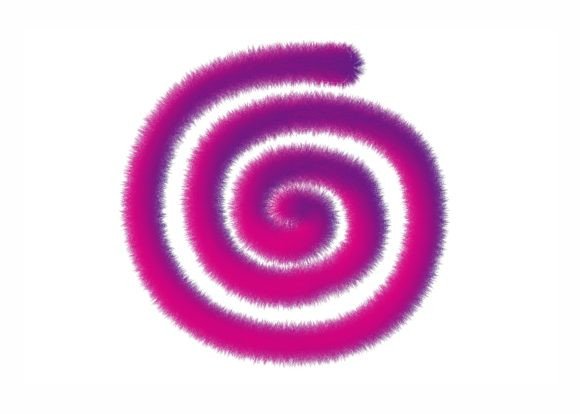
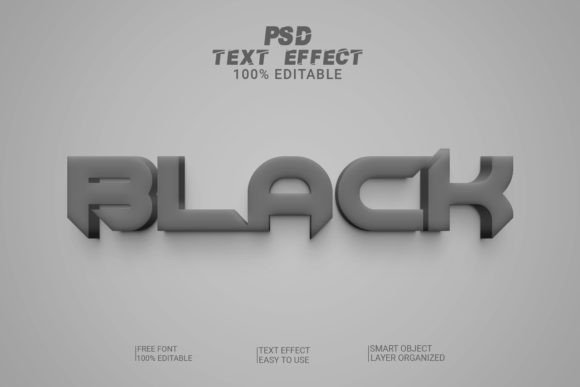
The PSD 3D Editable Text Effect is a layered Photoshop file that allows you to replace the default text with your own by simply clicking on a smart object layer. It features a bold, three-dimensional style that adds instant impact to any design. The file is set at 300 DPI resolution, ensuring high-quality output for both print and digital use. It also uses RGB color mode, making it ideal for web-based projects.
This type of text effect is particularly valuable because it maintains full editability. You don’t need advanced skills to tweak it—just open the PSD file, select the smart object, and enter your custom text. The rest is handled by the pre-built styles, allowing you to focus on creativity rather than technical details.
Why Use an Editable Psd Text Effect?
Editable PSD text effects are a game-changer for anyone looking to streamline their design process. Here’s why:
- Time-saving: Instead of building a 3D text effect from scratch, you can insert your text and render it instantly.
- Consistency: The layers are well-organized and structured, helping you maintain clean, consistent designs across multiple projects.
- High quality: With 300 DPI and RGB support, the effect ensures crisp visuals for both digital and print media.
- No Skill Required: Just replace the text and let the smart object do the rest—perfect for beginners and busy professionals alike.
These files are designed with real-world usability in mind. They’re not just flashy—they’re practical tools that fit seamlessly into your workflow.
Exploring Creative Possibilities
The beauty of the PSD 3D Editable Text Effect lies in its adaptability. Once you understand how it works, you can explore countless creative possibilities depending on your project goals. Here are some ideas to spark your imagination:
1. Branding and Logo Concepts
If you're designing a brand identity or logo, a 3D text effect can give your typography a modern, dynamic edge. For instance, a startup launching a tech product might use a metallic or glowing 3D text effect to communicate innovation and energy. Since the text is editable, you can experiment with different fonts and messages until you find the perfect match for your brand voice.
2. Social Media Graphics
For marketers and bloggers, attention-grabbing headlines are essential. A bold 3D text effect can make your social media posts stand out on crowded feeds. Try using it for Instagram banners, Facebook covers, or Twitter headers. The RGB format ensures vibrant colors that look great online, while the smart object feature lets you update the text quickly without losing quality.
3. Print Materials
From posters and flyers to magazine covers and packaging, the 3D editable text effect can elevate your printed materials. Its high-resolution nature means it won’t pixelate when scaled up, and the organized layers help you adjust colors, lighting, or shadows to suit your design context. A small business owner could use it to create a compelling storefront sign or event poster.
4. Website Headers and Banners
Websites often require strong visual elements to guide user attention. A well-designed 3D text header can serve as a focal point on landing pages, homepages, or promotional sections. Because it's fully editable and layered, you can integrate it with other design elements such as images, gradients, or animations to enhance your site’s aesthetic appeal.
5. Educational and Presentation Slides
Educators and presenters can benefit from using 3D text effects to highlight key points or titles in slides. A teacher creating a PowerPoint presentation about space exploration might use a futuristic 3D text effect to emphasize “Mission to Mars” or “Galactic Journey.” The ease of editing makes it simple to switch out titles between lessons or presentations.
How Different Users Can Adapt This Tool
One of the greatest strengths of the PSD 3D Editable Text Effect is its versatility. Let’s take a closer look at how various audiences can tailor it to their needs:
Designers: Streamline Your Workflow
Graphic designers often juggle multiple projects at once. Using an editable text effect saves time and keeps your design process efficient. You can reuse the same base effect across client projects, swapping out text and colors to maintain a cohesive yet customizable style. Plus, the smart object functionality means you can easily modify the effect later if a client requests changes.
Marketers: Create Impactful Campaigns
Marketing teams can leverage the 3D text effect to craft eye-catching campaign assets. Imagine using it for a product launch announcement, sales banner, or email newsletter headline. The boldness of the effect draws attention, while the RGB color mode ensures accurate rendering on screens. By keeping the design editable, you can rapidly test variations of your message without redoing the entire layout.
Bloggers and Content Creators: Enhance Visual Storytelling
Visual storytelling is crucial for blogs and online articles. A 3D editable text effect can be used to create striking headings, pull quotes, or infographics. For example, a travel blogger might apply a weathered stone or neon-style 3D text to highlight destination names or theme tags. These effects add personality and make the content more memorable.
Freelancers and Entrepreneurs: Deliver Professional Results
As a freelancer or entrepreneur, you want to deliver top-notch visuals without spending hours on them. This text effect helps you meet tight deadlines while maintaining a polished appearance. Whether you’re working on a website mockup, app interface, or promotional video thumbnail, the effect brings a level of sophistication that impresses clients and customers alike.
Hobbyists and Educators: Learn and Inspire
If you're new to Photoshop or teaching others, these files offer a hands-on way to learn smart objects and layer management. They also provide inspiration for students or enthusiasts experimenting with typography and effects. The structure of the file makes it easy to dissect and understand how each element contributes to the final result.
Practical Tips for Using the 3D Editable Text Effect
To get the most out of your PSD 3D Editable Text Effect, consider these best practices:
- Choose the Right Font: While the effect applies a 3D style, the font you select still plays a major role in the overall look. Match the font to your project’s tone—serif fonts for elegance, sans-serif for modernity, script for creativity.
- Experiment with Colors: Don’t be afraid to change the hue or gradient of the text to reflect your brand or theme. The layered structure gives you control over individual components like highlights, shadows, and ambient light.
- Maintain Readability: Even with bold effects, ensure your text remains legible. Avoid overly complex shadows or reflections that obscure the message.
- Keep Context in Mind: A glowing 3D effect may be perfect for a tech blog but too flashy for a corporate brochure. Tailor the effect to suit the audience and platform.
- Use Smart Objects Wisely: After replacing the text, always convert it back to a smart object to preserve scalability and prevent distortion when resizing.
Real-World Applications and Inspiration
Let’s dive into a few realistic examples to show how versatile this tool can be:
Example 1: Event Poster
A local music festival organizer wants to promote an upcoming event. They download the 3D editable text effect and replace the sample text with the event name and date. By tweaking the color scheme to match the festival’s branding, they create a poster that stands out and feels professional. The effect’s folder structure makes it easy to isolate the text and background for further customization.
Example 2: Product Packaging
An independent cosmetics brand needs a label for a new skincare line. They choose a matte-finish 3D text effect and incorporate soft pastel tones. The layered PSD allows them to adjust the lighting and texture to match the product’s luxurious feel. The result is a label that looks handmade yet professionally finished.
Example 3: YouTube Thumbnail
A content creator wants to boost engagement for a tutorial video. They apply a dramatic 3D text effect with a dark backdrop and bright highlights. The RGB settings ensure the thumbnail pops on screen, while the smart object makes it easy to update the title for future videos. This approach increases visibility and click-through rates.
Final Thoughts
The PSD 3D Editable Text Effect is more than just a design shortcut—it’s a catalyst for creativity. With its smart object replacement, high-quality resolution, and organized layers, it removes barriers to entry and enables users to produce impressive visuals effortlessly. Whether you're designing for a business, personal project, or educational purpose, this tool adapts to your needs and enhances your output.
So next time you need a standout text effect, skip the complicated tutorials and dive straight into the magic. Open the PSD, type your words, and let the design speak for itself. It’s that simple—and infinitely impactful.